
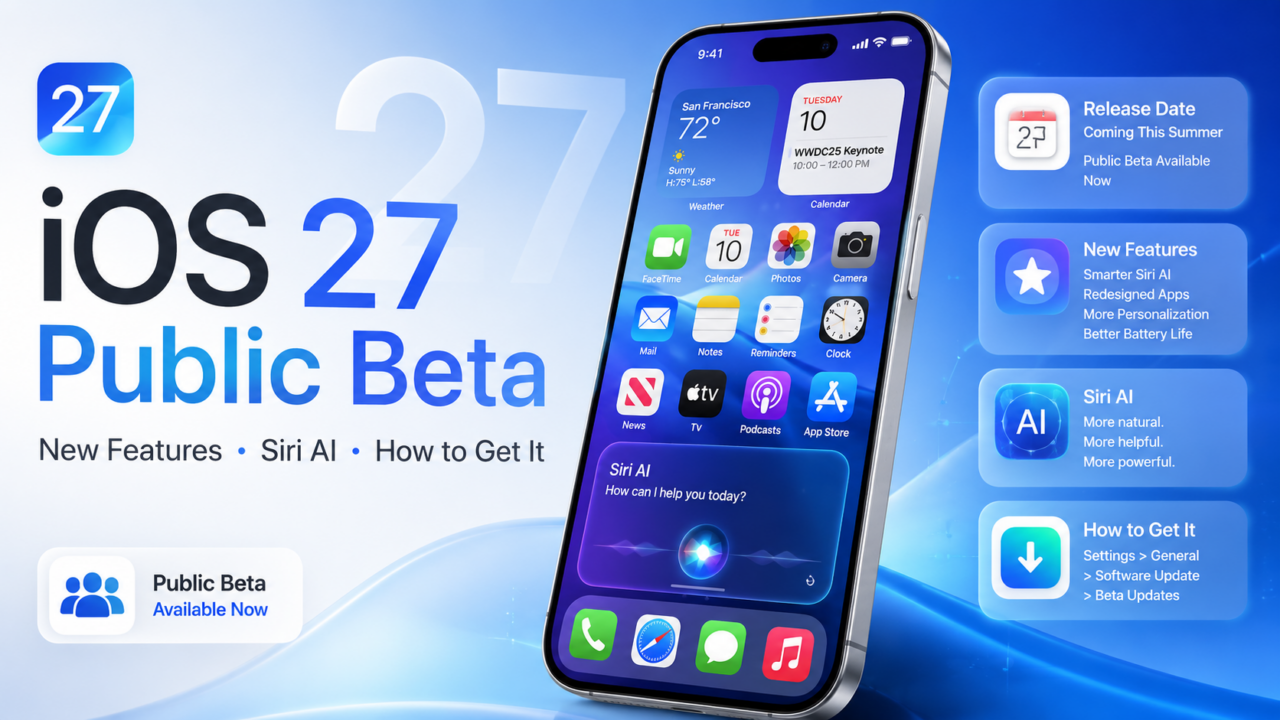
The wait is over; the iOS 27 public beta just dropped, and anyone with a supported iPhone can now try Apple’s biggest software update of the year for free. Siri AI is the headline act, but there’s a whole lot more packed in: a customizable Liquid Glass design, real speed gains, a major CarPlay glow-up, smarter Apple Wallet, and dozens of quality-of-life tweaks.
Here’s your complete guide to iOS 27, the release date, every major new feature, which iPhones are compatible, and exactly how to install the beta right now. We’ve also got a full FAQ at the bottom for all the quick “when does it come out” questions.
iOS 27 release date: When does iOS 27 come out?
Let’s start with the timeline, because that’s what most people want to know. Here’s the full iOS 27 release schedule:
- June 8, 2026 iOS 27 developer beta 1 (announced at WWDC 2026, Tim Cook’s final keynote as CEO)
- June 22, 2026 iOS 27 beta 2 (developer)
- July 6, 2026 iOS 27 developer beta 3
- July 13, 2026 iOS 27 public beta 1 (out now, identical to developer beta 3)
- Early-to-mid September 2026 Release Candidate (near-final build)
- ~September 2026 Final public release, expected alongside the new iPhone lineup
So when will iOS 27 be released to everyone? The full version is expected in mid-September 2026, in line with Apple’s years-long habit of shipping its major iOS update in the second week of September, next to the new iPhones. Until then, the betas will keep rolling out through the summer.
How to get the iOS 27 beta
You don’t need to be a developer, and you don’t need to pay anything. The iOS 27 public beta is free through Apple’s Beta Software Program. Here’s how to download it:
- Back up your iPhone first (to iCloud or a computer). Beta software can have bugs, battery drain, and app compatibility hiccups, so a backup is your safety net.
- Go to the Apple Beta Software Program site at beta.apple.com and tap Sign Up or Sign In.
- Sign in with the same Apple Account you use on your iPhone, then accept the terms to enroll.
- On your iPhone, open Settings > General > Software Update > Beta Updates.
- Select iOS 27 Public Beta.
- Go back to the Software Update screen and tap Update Now (or Download and Install) when iOS 27 appears.
The download runs roughly 5–8 GB, and the whole process takes about an hour with a couple of restarts, so stay on Wi-Fi and keep your phone charging. Apple strongly recommends installing beta software on a secondary device, not the iPhone you rely on every day.
How to get the iOS 27 developer beta: the steps are identical, just pick “iOS 27 Developer Beta” in step 5. A free Apple Developer account works fine (grab one through the Apple Developer app), so you no longer need the $99/year membership just to test.
iOS 27 compatible devices: which iPhones are supported?
Good news if you’re on an older iPhone: iOS 27 supports every iPhone that runs iOS 26. That means the minimum is the iPhone 11 (A13 Bionic chip). Here’s the breakdown:
iOS 27 supported devices: iPhone 11, 11 Pro, and 11 Pro Max; iPhone 12, 13, 14, 15, 16, and 17 lineups; iPhone Air; and iPhone SE (2nd generation and later).
No longer supported: iPhone XS, XS Max, XR, X, 8, 8 Plus, and the 1st-gen iPhone SE.
Here’s the important catch: while the base update runs on all those phones, Apple Intelligence and Siri AI require an iPhone 15 Pro or newer (A17 Pro chip, 8GB of RAM). And a handful of the most advanced on-device Siri features need the very latest hardware: iPhone 17 Pro, iPhone 17 Pro Max, or iPhone Air. So older supported iPhones get iOS 27’s design and performance upgrades, just without the full AI layer.
iOS 27 Siri app features (and the Siri waitlist you should know about)
Siri AI is the single biggest reason to care about iOS 27. Apple rebuilt Siri from the ground up on its next-generation Apple Intelligence system, and it’s a night-and-day upgrade over the old assistant.
What the new Siri app can do:
- Hold a genuine back-and-forth conversation, no more repeating yourself for a follow-up question.
- Search your personal information across Mail, Messages, Notes, Reminders, and Calendar (and, as of beta 3, pull info from some third-party apps too).
- Understand what’s on your screen and take actions inside apps for you.
- Live in a standalone Siri app that keeps your conversation history in one place and syncs it privately through iCloud.
Siri responses now emerge from the Dynamic Island pull-down on one to open the full conversation. There’s also a new Camera Siri mode for Visual Intelligence: snap a membership barcode to turn it into a Wallet pass, or point it at a flyer to create a calendar event. And under Settings > Siri > Voice, you can fine-tune Siri’s pace and expressivity (which also affects spoken directions in Maps and Safari).
The iOS 27 Siri waitlist: here’s the thing to know Siri AI isn’t guaranteed to switch on the moment you update. Apple is gating it behind a waitlist. To join, open Settings > Siri and tap to join the new Siri waiting list; you’ll be notified when it’s ready for your device, which can take a few weeks. Siri AI is also English-first at launch and won’t be available in the EU or China right away due to regulatory requirements. For a deeper dive on the rebuilt assistant, see our breakdown of iOS 27’s Google Gemini-powered Siri.
iOS 27 new features: Apple Intelligence across your apps
The AI smarts go way beyond Siri. Some of the best iOS 27 features are sprinkled throughout Apple’s built-in apps:
- Safari can automatically organize your tabs by topic, group bookmarks and Reading List items, and surface recently closed tabs on the Start Page. A new Notify Me feature watches a webpage for a change like an item coming back in stock, and Safari can even build a simple extension from a plain-language description.
- Photos gains three powerful editing tools: Clean Up (remove larger, complex distractions), Extend (generate image content beyond the original frame), and Spatial Reframing (adjust the apparent camera angle after you’ve taken the shot).
- Passwords can automatically replace weak or compromised passwords for you, handling verification codes and showing progress in a Live Activity.
- Shortcuts can now build an entire automation from a plain-language request just describe what you want.
- Phone adds Call Context, surfacing details like reservation numbers when you call a business.
- Image Playground gets photorealistic generation and natural-language editing.
iOS 27 Apple Calendar update
For the calendar keyword crowd: Calendar now supports natural-language event creation and editing. Type or dictate something like “lunch with Sam next Friday at noon” and iOS 27 builds the event for you. Siri can also drop events straight into Calendar from a photographed flyer.
iOS 27 makes Liquid Glass customizable
iOS 27 doesn’t ditch last year’s Liquid Glass design; it refines it and, crucially, lets you control it. Apple improved how translucent controls diffuse busy backgrounds, added darker edges and brighter highlights for better separation, and gave app icons more depth and definition.
The star addition is the new Liquid Glass customization slider, found under Settings > Appearance. It ranges from ultra-clear (maximum translucency) all the way to fully tinted (basically opaque), and it applies system-wide, including third-party apps. If you found last year’s frosted look hard to read, this puts you back in charge.
iOS 27 wallpaper: new looks to try
iOS 27 ships with a fresh batch of wallpapers 14 new wave-style designs in a range of colors, which also carry over to the CarPlay interface. There’s a new Pride-themed option in the mix too. One small but handy visual tweak: some Lock Screen Control Center buttons now use black icons instead of white, so they stay readable against lighter wallpapers.
iOS 27 speed: faster, even on older iPhones
One of the most underrated parts of iOS 27 is raw performance, and it isn’t limited to the newest phones. Apple says:
- Apps launch up to 30% faster
- Nearby AirDrop transfers finish up to 80% faster
- New photos appear in your camera roll up to 70% faster
Apple optimized the CPU scheduler all the way back to the iPhone 11, so unlocking, Home Screen navigation, Control Center scrolling, and Lock Screen switching all feel smoother. The Camera launches faster in Low Power Mode, your iPhone switches between Wi-Fi and cellular more intelligently (so it stops clinging to a dead network as you leave the house), and search is rebuilt across Spotlight, Photos, and Mail with Mail now showing up to five ranked Top Results.
iOS 27 CarPlay features
CarPlay is getting a ton of love this year, arguably its most practical update in ages. The big iOS 27 CarPlay features:
- Siri AI in the car: hands-free conversational Siri with a slick new glowing orb button at the bottom of the screen and an animated light that wraps the display edge when active. It understands context (like navigating to a restaurant a friend texted you about) and syncs your conversation to your iPhone for later. Requires iPhone 15 Pro or newer; standard iPhones get the new look but not the advanced smarts.
- Video apps: browse and watch video on your car’s display while parked (playback switches to audio-only once you shift into drive). Apple TV is first to support it, though automakers have to enable the feature.
- Persistent audio mini-player: a floating media controller sits in the top corner over your maps, so you can pause or skip tracks without covering your navigation. A passenger can control audio too.
- Audio scrubbing: the Now Playing screen finally has a progress bar to jump to any point in a song, podcast, or audiobook.
- EV routing: Maps can share route data with your vehicle, check it against your battery range, and suggest charging stops.
- Better reliability: more stable wireless CarPlay connections, improved GPS accuracy, and heading detection.
- In-car accessibility: Sound Recognition flashes visual alerts for sirens and horns, full Voice Control, Color Filters, and Bold Text.
- Silent Mode sync and the new Liquid Glass icons and 14 wallpapers round it out.
iOS 27 Apple Wallet features
Apple Wallet gets genuinely useful upgrades in iOS 27:
- Digitize any physical card or pass, even obscure local ones, by scanning them, with no need for the business to have built native Wallet support. This is a big one.
- A new bill-splitting tool: snap a photo of a receipt inside Wallet (or pull one from Photos) and iOS 27 parses the text to split the total.
- Plus, as noted above, Siri’s Camera mode can turn a scanned barcode into a Wallet pass on the spot.
iOS 27 accessibility features
Beyond the in-car accessibility tools, iOS 27 continues Apple’s push on inclusivity, including Live Recognition improvements and the systemwide Sound Recognition, Voice Control, Color Filters, and Bold Text options that now extend into CarPlay. These make the update more usable for people who are deaf or hard of hearing, have low vision, or are colorblind.
iCloud+ AI benefits in iOS 27
If you pay for an iCloud+ plan, iOS 27 quietly hands you two extra perks at no additional cost:
- Higher daily usage limits for some Apple Intelligence features, including image generation in the revamped Image Playground app.
- HomeKit Secure Video upgrades include AI-generated video summaries and native 4K camera support with eligible hardware.
More iOS 27 features worth trying
The smaller stuff adds up fast:
- Messages send large media in the background without blocking newer texts and consolidate group-chat Tapback notifications.
- Photos adds full-resolution Shared Albums, Windows and Android contributions, keywords, star ratings, and customizable slideshows.
- Save any video frame as a full-resolution photo with one tap.
- Set alarm volume independently of your system volume.
- Extra-large widgets can fill an entire Home Screen page.
- AirPods get a custom equalizer for lows, mids, and highs.
- Your iPhone can connect directly to compatible GymKit equipment.
- FaceTime supports simultaneous front and rear camera video on iPhone Air and iPhone 17 models.
Screen Time and child safety overhaul
iOS 27 also delivers a long-overdue parental controls revamp. A cleaner dashboard gives parents one-tap access to changes, Time Allowances set limits for categories like Games, Entertainment, and Social Media, and Schedules control which apps are available during school days, evenings, and weekends. Ask to Browse extends the familiar Ask to Buy flow to websites; kids can be required to request permission before contacting someone new, and Communication Safety now steps in on gore and violent content in addition to blurring nudity. (Note: this requires the participating Family Sharing devices to be on the OS 27 generation.)
Should you install the iOS 27 public beta?
If you’ve got a spare iPhone lying around, go for it; testers are calling this one unusually stable for a summer beta. But if it’s your only phone, the smart move is to wait for the final release in September, since beta bugs and battery drain are real. Either way, iOS 27 is shaping up to be one of Apple’s most worthwhile updates in years. For the full rundown of everything new, check our complete iOS 27 features guide, and if you’re eyeing an upgrade, the new iPhones (including Apple’s first foldable iPhone) are expected to land right alongside the September release.
iOS 27 FAQs
When does iOS 27 come out? The full version of iOS 27 is expected in mid-September 2026, alongside Apple’s new iPhone lineup. Apple has only officially said “this fall,” but it consistently ships its major iOS update in the second week of September.
When is iOS 27 coming out to everyone? The final, stable release for all users is expected around mid-September 2026. Right now (July 2026), only the beta versions are available.
When does the iOS 27 beta come out? Is it out now? Yes. The iOS 27 public beta launched on July 13, 2026, and is available now. The developer beta has been out since June 8, 2026, with beta 2 on June 22 and beta 3 on July 6.
How to get iOS 27 (the public beta)? Back up your iPhone, enroll your Apple Account at beta.apple.com, then go to Settings > General > Software Update > Beta Updates and select “iOS 27 Public Beta.” Tap Update Now when it appears. It’s free.
How to download the iOS 27 beta safely? Always back up to iCloud or a computer first, install on a secondary device if you can, and stay on Wi-Fi with a charger. The download is about 5–8 GB and takes roughly an hour.
How to get the iOS 27 developer beta? Sign in with a free Apple Developer account, then choose “iOS 27 Developer Beta” under Settings > General > Software Update > Beta Updates. You no longer need the paid $99/year membership for beta access.
When will the iOS 27 release candidate come out? The near-final release candidate is expected in early September 2026, roughly a week before the public launch and around Apple’s September iPhone event.
When is iOS 27 releasing on my iPhone? If your iPhone runs iOS 26, it will get iOS 27 on the same mid-September timeline. Note that Siri AI and Apple Intelligence require an iPhone 15 Pro or newer.
Why isn’t Siri AI working after I install iOS 27? Siri AI is gated behind a waitlist. Open Settings > Siri to join it; access can take a few weeks. It’s also English-first and unavailable in the EU and China at launch.
Is iOS 27 available in the EU? iOS 27 itself is, but Siri AI is not available in the European Union at launch due to Digital Markets Act requirements. It’s also unavailable in China for now.
iOS 27 is in public beta and will keep changing through the summer before its final release. Sourcing: Apple, 9to5Mac, MacRumors, Forbes, Tom’s Guide, and Macworld. Features and dates are subject to change.