

Most people misprice their Macs. Some accept the first lowball; others list way too high and wait forever. The truth is, your Mac’s “real” value isn’t a guess—it comes down to four key factors: specs, battery health, condition, and functionality.
Selling a used Mac can feel like a guessing game. Some people take the first lowball offer just to be done with it. Others price their machine too high, letting it gather dust for months while its value slowly drops.
Forget guesswork. Spend five minutes on this guide, and you’ll be able to price your Mac with confidence. If you want the faster trade-in route instead of listing it yourself, you can also get a live quote through SellMac’s Apple device buyback page. For MacBook Pro owners specifically, use the MacBook Pro value calculator to see how model, specs, and condition affect the offer.
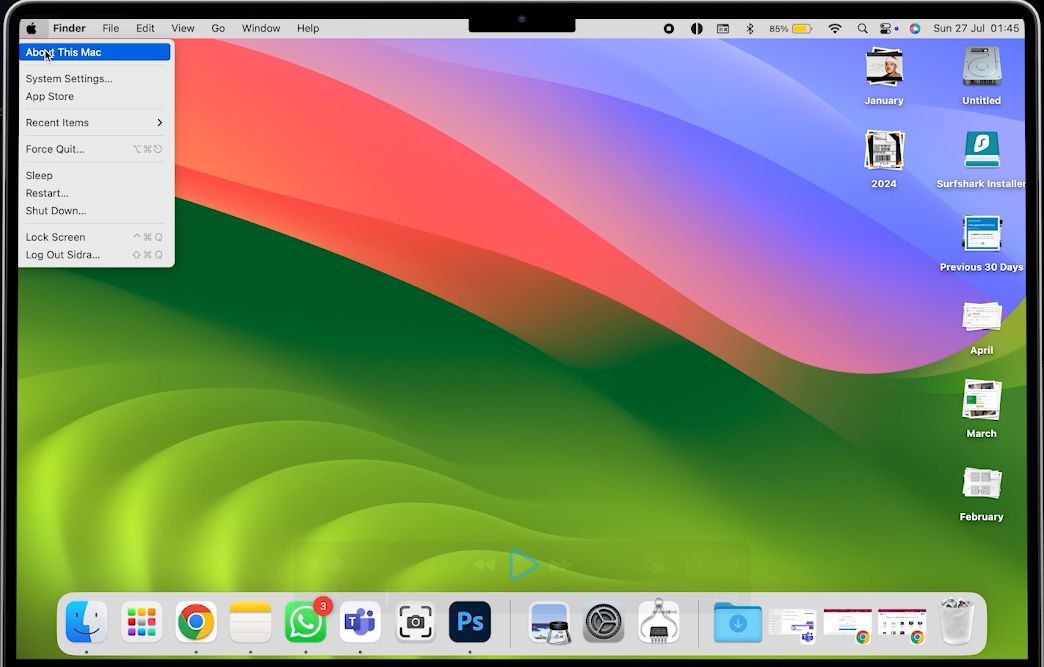
1) Gather the Exact Specs (Get Your Mac’s “DNA”)
Where to find them (macOS):
- Click the Apple logo in the top-left.
- Select About This Mac.
- Note these details:
- Processor/Chip (M1, M2, M3, M4, Intel i5/i7/i9, etc.)
- RAM (8GB, 16GB, 32GB, 64GB, etc.)
- Storage (SSD) (256GB, 512GB, 1TB, 2TB, etc.)
- Model year (for example, 2017, 2020, 2021, 2023, 2024)
- Display size (13″, 14″, 15″, 16″, etc.)
Why this matters: Two “similar” Macs can sell for very different amounts because of RAM/SSD upgrades, chip generation, and screen size. Don’t guess—write it down. These specs are the foundation of your Mac’s value.
If you are not sure which model you have, use SellMac’s Apple serial number lookup before pricing or trading it in. It is especially useful for MacBook Pro models where year, screen size, chip, RAM, and storage can easily get mixed up.
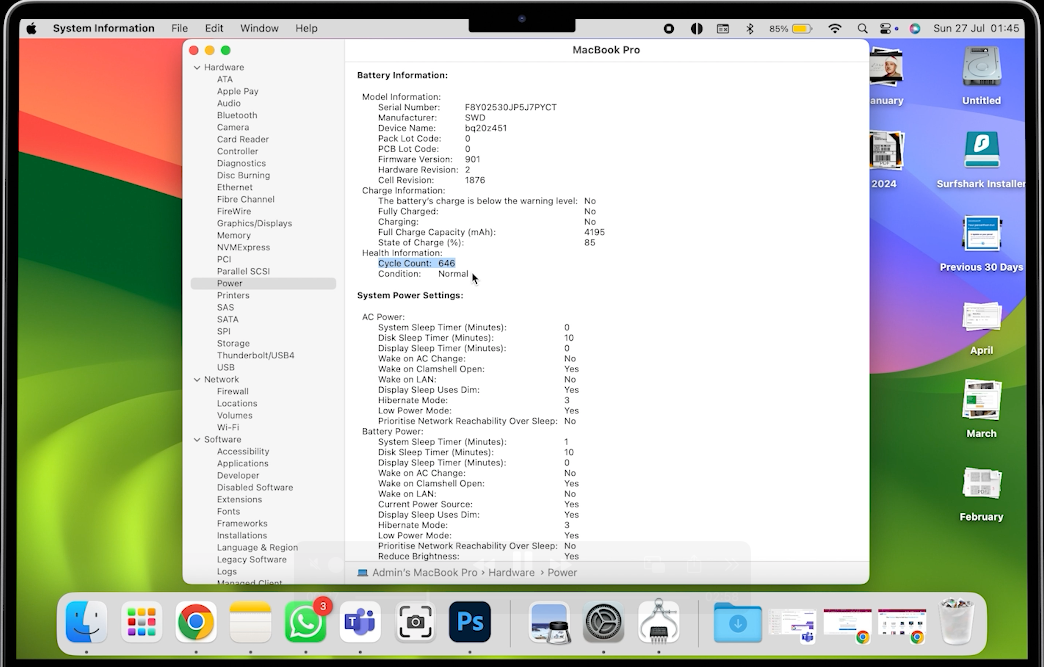
2) Check Battery Health (Buyers Care a Lot)
Deep check path: About This Mac → System Report → Power → Cycle Count.
- From the “About This Mac” window, click System Report…
- In the new window, find the Power section on the left-hand sidebar.
- Look for the Cycle Count under the “Health Information” section.
How to interpret cycle count:
- Under 300: Excellent
- 300–800: Normal wear
- Over 800: Likely needs replacement soon
A healthy battery meaningfully boosts price—and confidence. A weak battery does not always make a Mac worthless, but it can move the value down, especially if the buyer expects to replace it soon.

3) Inspect Physical Condition (Honesty Pays)
This is where you need to be brutally honest. A buyer will spot issues immediately, so it is better to be transparent.
Give your Mac a careful once-over in good natural light:
- Cosmetics: dents, scuffs, scratches, screen marks, loose hinges
- Keyboard/trackpad: sticky or non-responsive keys, tap/gesture accuracy
- Ports: plug in a device to every port—USB-C/USB-A, HDMI, audio, SD, etc.
- Speakers & webcam: play audio, open your camera app, and test video
Photo tip: Take clear, honest photos in natural light from multiple angles.
Why: Clear photos = more trust = better and faster offers.
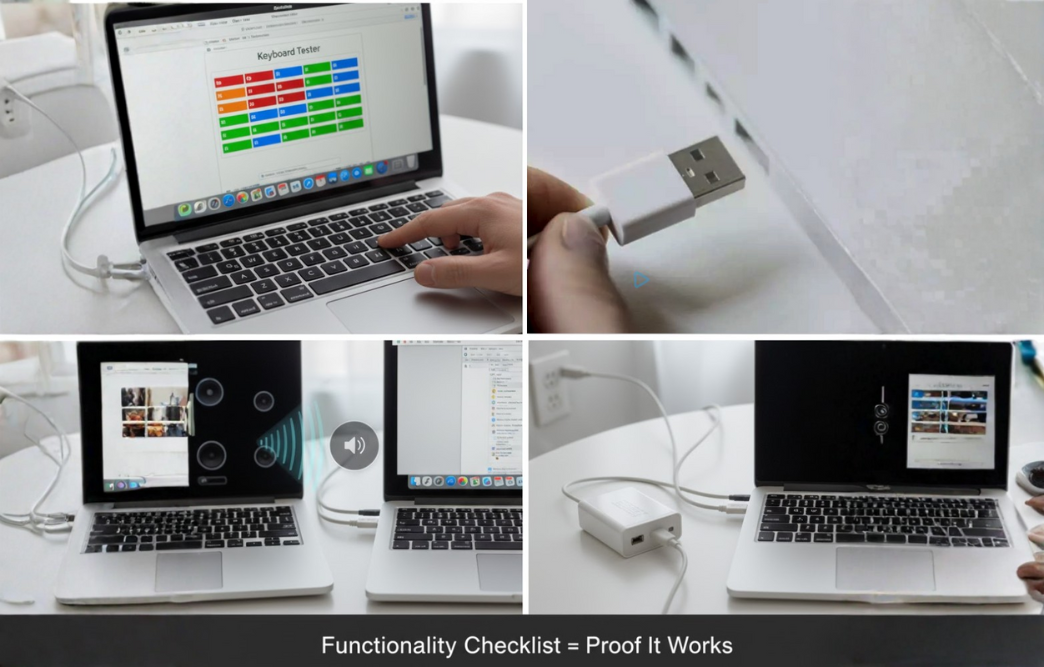
4) Functionality Checklist (Prove It Works)
- Boot, sleep/wake, Wi‑Fi, Bluetooth
- External display output
- Keyboard: test every key
- Trackpad gestures
- Microphone, speakers, webcam
- Charger: confirm it is original and working if you plan to include it
Boosters: higher RAM/SSD, healthy battery, clean screen/body, original charger.
Value killers: dents, scratches, cracks, weak battery, screen defects, keyboard issues, missing charger, liquid damage, and Activation Lock problems.
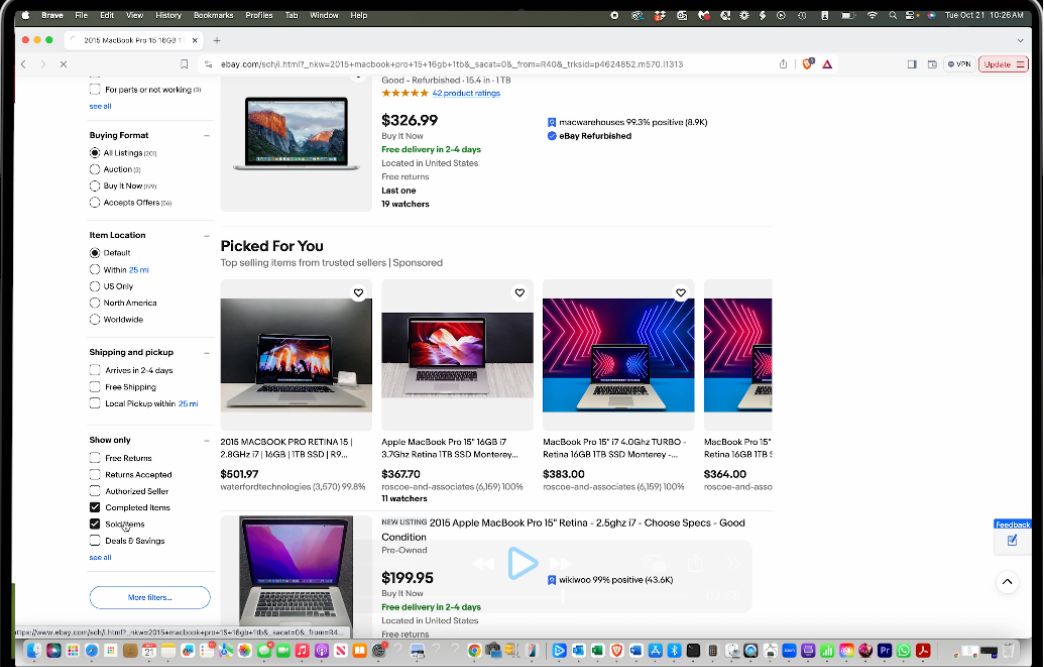
5) Price With Data: Use eBay’s “Sold” Filter
You want actual sale prices, not wishful asking prices.
Step-by-step:
- Go to eBay.com.
- Search for your exact model details: year + device type + screen size + RAM + SSD.
- Example: “MacBook Pro 2019 16-inch 16GB 512GB i7”
- In the left sidebar, click Sold items and Completed if available.
- Study the range of final sale prices. Focus on listings that match your processor/chip, RAM/SSD, battery condition, cosmetic condition, and recent sale dates.
- Identify why the higher or lower ones sold: better chip, cleaner cosmetics, lower cycle count, original packaging, or stronger specs.
You might see a wide range for older models. Your job is to figure out where your Mac fits in that range. A machine in excellent condition with a low cycle count will usually sit higher. A good-condition Mac with scratches and a high cycle count will usually sit lower.
Pricing tip:
- If your battery is strong and the condition is clean, the price is toward the upper-middle.
- If there is wear or high cycles, price toward the middle-lower—then explain the trade-offs in the description to avoid returns.
6) Write a Listing That Sells (Template)
Title: Year Model Size — Chip/CPU, RAM, SSD, Condition, Cycle Count
Description (copy & fill):
- Model/Year/Size: 20XX MacBook 13″
- Chip/CPU:
- RAM/Storage:
- Battery: Cycle count ~[###], health
- Condition:
- Functionality: All ports tested, keyboard/trackpad perfect, speakers/webcam OK
- Includes:
- Notes:
Photos: Front/back, both sides, keyboard close-up, screen on, ports, charger, and any blemishes.
Trade-In vs Private Sale (Choose Your Selling Path)
You have your price. Now, how do you want to sell it?
- Maximum value, more effort: Selling directly on sites like eBay or Facebook Marketplace can get you more money, but you have to create the listing, talk to buyers, handle shipping, and deal with possible returns or disputes.
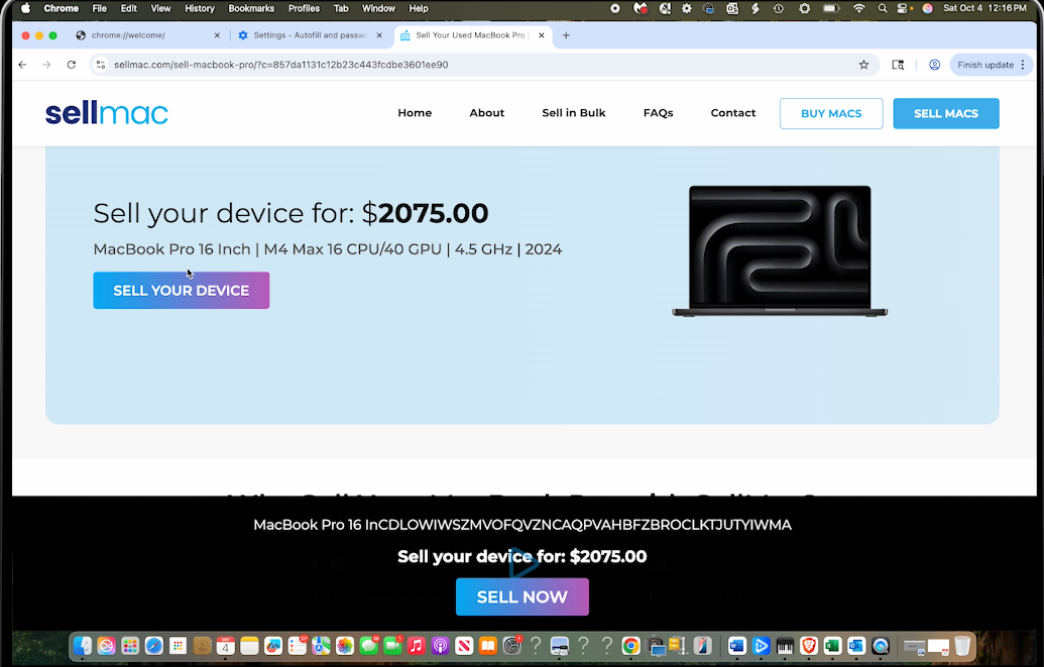
- Fast and easy, less hassle: If you want to sell without the headache, a buyback service like SellMac gives you a quote, free tracked shipping, secure data wipe, and payout after inspection. You trade some private-sale upside for speed and certainty.
SellMac is especially useful if you want to skip listing, messaging buyers, and negotiating. You can start with the main Sell Apple devices page, or go directly to sell your MacBook Pro.
If you are specifically wondering what a MacBook Pro is worth today, use the dedicated MacBook Pro value calculator. It explains why year alone is not enough and shows how specs, battery health, screen condition, and damage affect the offer.
If you’re upgrading, Techable.com can also be part of that path: buy your next Mac from Techable, and use SellMac to turn the old one into cash.

Final 5-Minute Checklist
- Record chip/CPU, RAM, SSD, year, and display size.
- Check battery cycle count under Power → Cycle Count.
- Inspect cosmetics: dents, scratches, screen, hinges, keyboard, and ports.
- Test every port, every key, speakers, webcam, Wi‑Fi, and Bluetooth.
- Take clear, honest photos in natural light.
- Compare recent Sold prices on eBay that match your specs and condition.
- Choose private sale or trade-in based on your timeline and risk tolerance.
FAQs
Q: My specs match, but my Mac still sells lower. Why?
A: Cosmetics or battery health are likely the tie-breakers. Also, check if the higher comps had the original box/charger, lower cycle count, or stronger condition notes.
Q: How much does battery health really matter?
A: A lot. Below ~300 cycles usually commands a premium; over ~800 tends to push you down the range because replacement is looming.
Q: Should I fix small cosmetic issues?
A: Only if cheap and fast. Cleaning and accurate photos are usually enough. Be transparent to reduce returns and disputes.
Q: How do I prevent Activation Lock issues for the buyer?
A: Before listing or trading in your Mac, sign out of your Apple ID, turn off Find My, and erase the Mac. On Apple silicon/T2 models, use Erase All Content and Settings; on Intel, also reset NVRAM. Leave the Mac at the setup assistant screen. This avoids Activation Lock headaches and builds buyer trust.
Q: Why use SellMac instead of selling privately?
A: SellMac streamlines the process: you get a quote, a prepaid tracked shipping label, secure data-wipe handling, and payout after inspection. No listing fees, no back-and-forth with buyers, and less risk of returns or scams. If you want the MacBook Pro-specific version, start with the MacBook Pro value calculator.
Q: Do retailers like Techable.com offer reliable upgrade paths?
A: Yes. If you are upgrading, Techable is a strong place to shop for tested Apple hardware, and SellMac can handle the trade-in side when you are ready to sell the old Mac.
Conclusion
Price is not a guess. When you document specs, battery, condition, and functionality, you can land at a fair number quickly and attract the right buyers. Prefer speed and certainty? Use a reputable trade-in service like SellMac. Want maximum value? List privately with great photos and a detailed, honest description.
Spend five minutes on the steps above and you’ll price with confidence—and get paid faster.